Project 6: Digital Toolbox
Digital Toolbox

Communication: Skype
When thinking about the attributes of a global educator, Skype is an online technology that helps me to "flatten" the learning, encourage and model global citizenship, and design futuristic learning. Through Skype, my students can learn about and collaborate with students all over the world. The world has now become accessible to them and they have the opportunity to interact and learn from people they most likely would not have had the opportunity to learn from otherwise. Through these interactions, the students will gain knowledge of other cultures and empathy for the struggles that people may face around the world.
Community & Social Media: Twitter
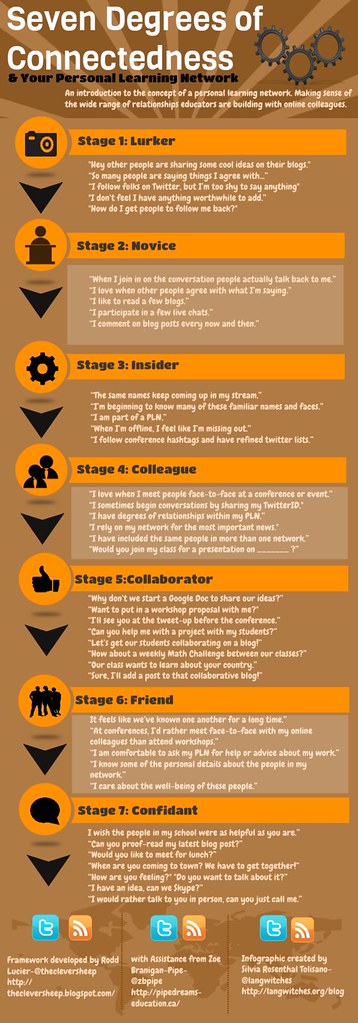
Twitter definitely helps me collaborate anywhere, anytime. I have grown both my professional learning network and my confidence through the Twitter chats I participated in. At the beginning of this course, I considered myself a "lurker"- someone who followed other educators and had things to say, but didn't feel that it was worthwhile to share. After participating in the Twitter chats and being required to ask questions, answer questions, and interact with other educators, I now feel like I have moved up to a "novice". I feel more confident in the value of what I have to say during Twitter chats, and I have found educational professionals that I follow closely and frequently respond and retweet to.
Workflow & Scheduling: Google Calendar
Google Calendar helps me to be a better educator by handling the "logistics" side of global collaboration. It makes connecting with others around the world much more organized. My students will be able to collaborate more easily with others by using the "find a time" feature to find availability and linking relevant attachments to their video chats. Though it's not the most glamorous of tools, Google Calendar helps me to reach my goal of becoming a global educator because is a tool that allows us to get to the interactive and collaborative pieces.
Collaboration & Co-Creation: PenPal Schools
Though I haven't had a chance to experience it yet, PenPal Schools seems to be an excellent collaboration and co-creation tool. By using it, I would "flatten" the learning for my students, encourage global citizenship, use synchronous and asynchronous online technologies, and design futuristic learning environments to connect with the world- almost all of the attributes of a global educator! PenPal Schools would allow my students to make genuine collaborative connections with others and create a product of their choice to show what they've learned. I am excited to try PenPal Schools in the future!
Celebration: Symbaloo
Symbaloo seems like an excellent way to showcase student work to the world. When students create something for a project and upload it, we could create a class Symbaloo page. This way, they can personalize their own icon and easily share their work with the world, while also being able to easily provide feedback to the work of their peers. When working with another class located somewhere else around the world, they could also upload their work to the Symbaloo page so all students could easily see each other's work.
Lily,
ReplyDeleteYou have collected a good selection of tools with a wide range of uses that will assist you as you make the transition to global education. I like that you selected flexible tools that aren't only useful for your professional growth but will also assist your students in making global connections as well.
Dr. Dell